Upgrading TAS 5.19 to 5.21 – Guide for Consultants
What a consultant does when upgrading a customer instance from 5.19 to 5.21: checking template code in the Service Console and reviewing the changes that may affect the customer.
Summary
After the upgrade to 5.21, a consultant has to do only one thing for every customer: run validation.checkMigration() in the Service Console and fix whatever it reports. Everything else in this article only concerns you if the customer uses the feature in question. That is why each change has a Relevant if… line. If it does not apply to you, feel free to skip it.
The check cannot be run in advance on 5.19. The Template validation plugin version for 5.19 does not contain the new rules. They were added in version 2.5.0, which is part of 5.21. We therefore recommend doing a dry run on a copy of the production database first.
Step by step: validation.checkMigration()
The check goes through the code of all templates and global scripts in a few seconds and does not change anything. It is run by an administrator.
1. Open the Service Console
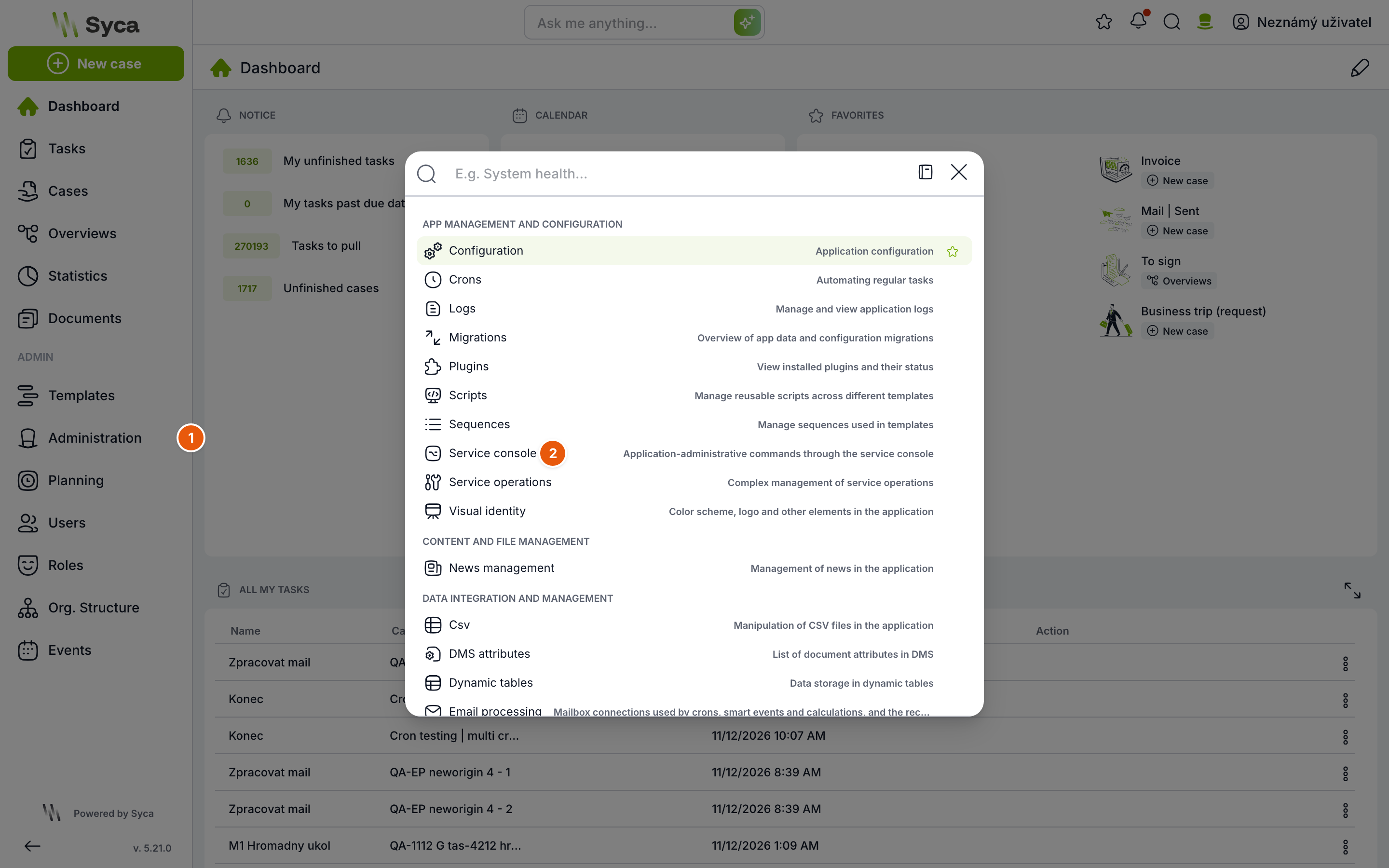
In the left menu, click Administration (1) and select Service Console (2) in the window.
2. Run the check for the whole system
Type validation.checkMigration() into the editor, leave the return: checkbox selected and click Send.
The top of the output shows how much code was checked and how many problems were found, followed by a table grouped by rule:
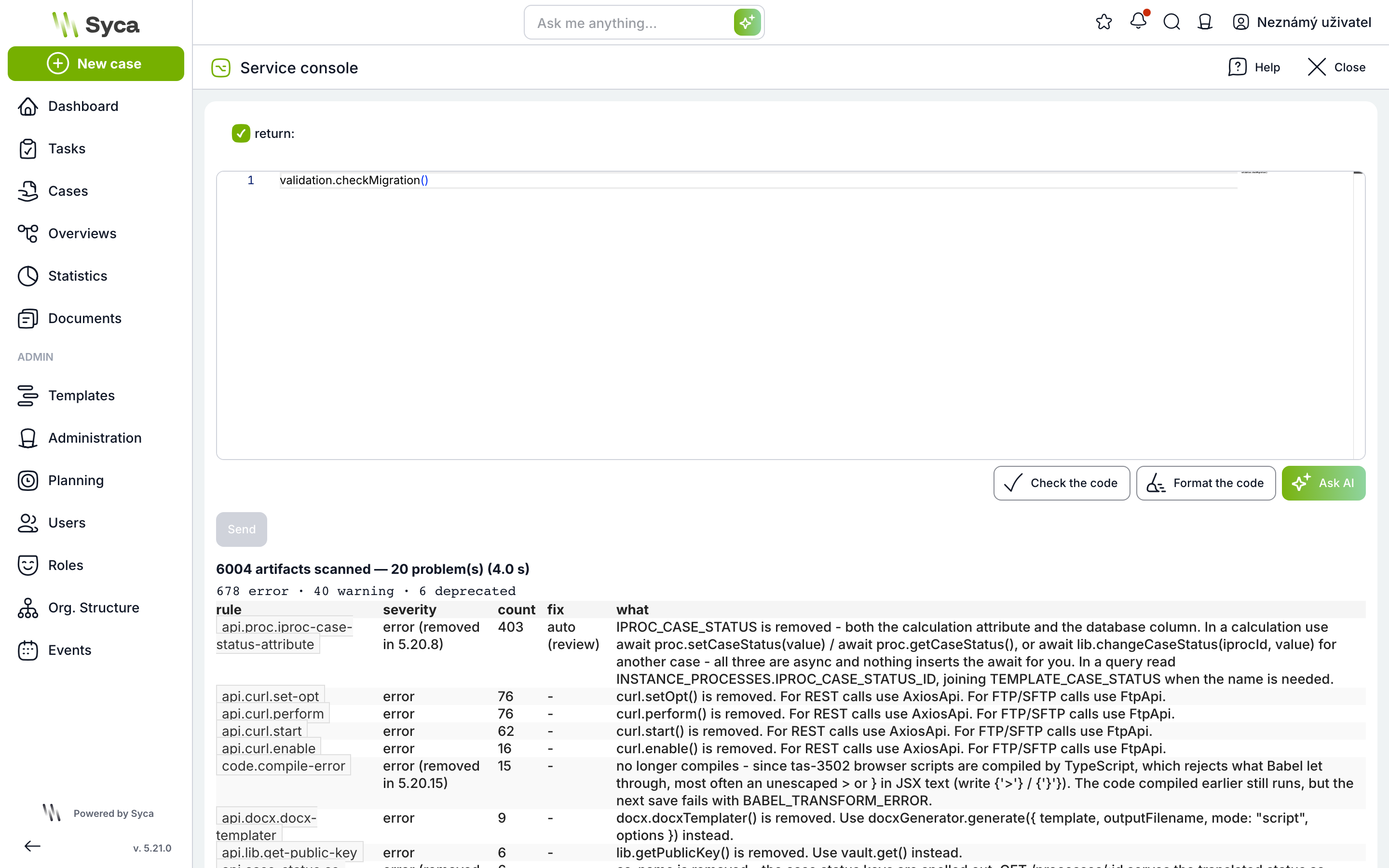
Column | Meaning |
| Rule ID. This is what you pass to |
| error = does not work; fix before going live for users. warning = runs, but behaves incorrectly. deprecated = still works, but will be removed in a future version. |
| Number of occurrences found |
| auto (safe) = the automatic fix is safe. auto (review) = an automatic fix exists, but check the result. - = fix manually. |
| What changed and what to replace the code with |
At the end of the output, the console suggests the next step itself (next:).
3. Find the specific places
validation.checkRule('api.proc.iproc-case-status-attribute') lists every occurrence: the template, the type of place (task calculation, condition tree…), the specific task or condition, and details. The template and task names are links that open the task calculation directly. The links open in the same tab, so open them with the middle mouse button.
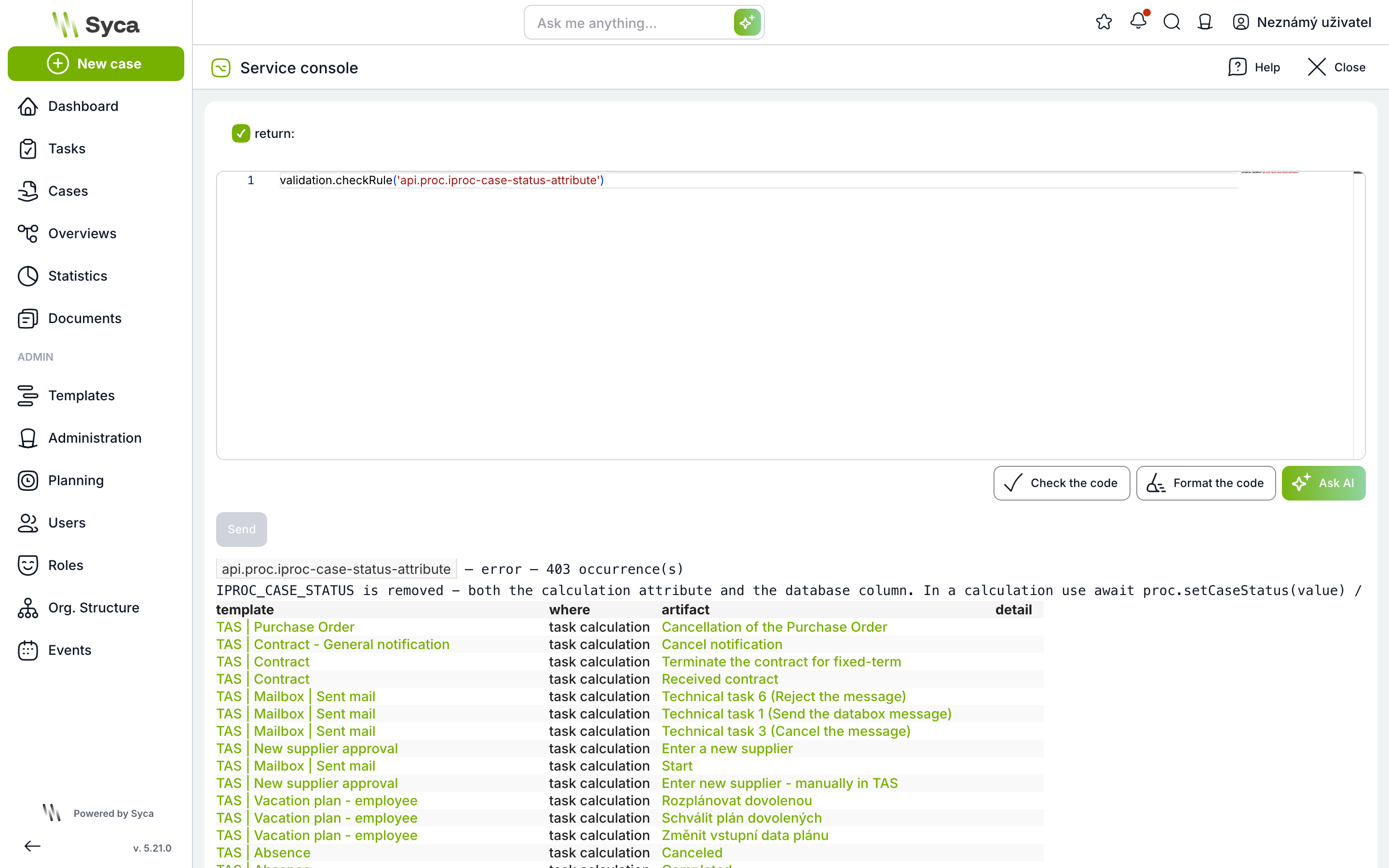
The output shows at most 200 rows. If there are more, work template by template: add the template number (TPROC_ID from the template URL) as an additional parameter, e.g. validation.checkMigration(61) or validation.checkRule('api.proc.iproc-case-status-attribute', 61).
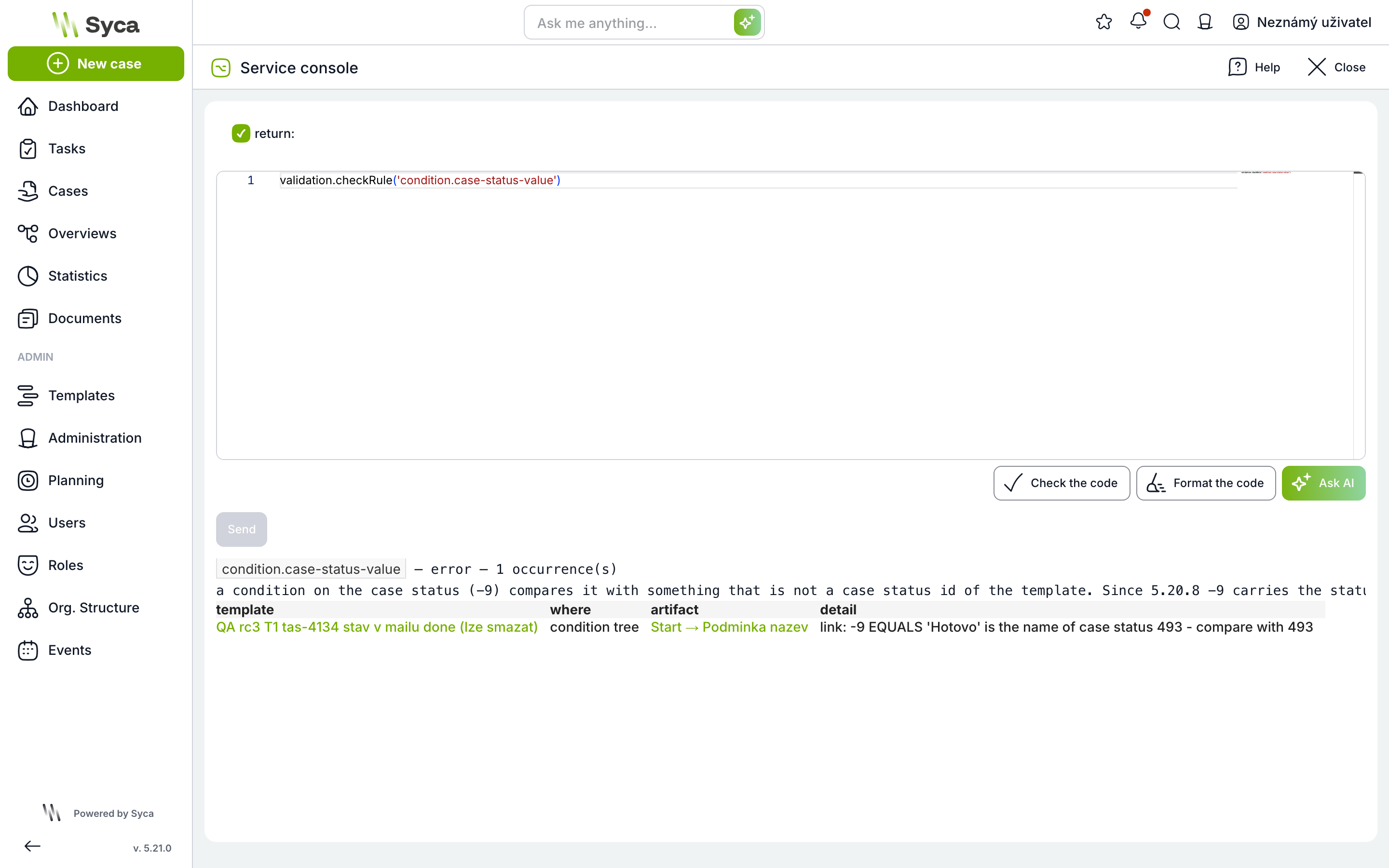
For conditions on the case status, the details tell you exactly what to fix, e.g. “-9 EQUALS 'Hotovo' is the name of case status 493 - compare with 493”.
4. Fix
Rules with an automatic fix are fixed by validation.fix('<rule id>'). The command rewrites the code and lists every change.
- Try it on a single template first:
validation.fix('api.proc.iproc-case-status-attribute', 61), review the listed changes and click through the template. Only then run the fix for the whole system. - A fix limited to a template never touches global scripts. These are only fixed by a call without a template number.
- Do the fix on the dry run first. Before fixing production, make sure you have template exports.
- Fix rules without an automatic fix manually according to the what column.
5. Repeat the check
Run validation.checkMigration() again. You are done when no errors remain in the output.
Rules introduced in 5.21
Rule | Fix | Description of the change in section |
| automatic (review) | Case status is set differently in calculations |
| manual | Condition on case status compares the ID |
| manual |
|
| manual | React and JSX scripts are compiled by TypeScript |
| manual |
|
| automatic (safe) | Old MUI Grid syntax in React scripts |
The check also reports older rules, e.g. api.curl.*, api.docx.*, lodash.* or lib.getPublicKey(). These are not a consequence of moving to 5.21: such code did not work in 5.19 either, so fix it when you get to it. Other functions of the validation plugin are described in the article Using validation functions.
What changes in 5.21
The changes are sorted by area. Items marked (found by checkMigration) are listed by the console itself, so you do not have to search for them manually.
Case status
Case status is set differently in calculations (found by checkMigration)
In 5.21, the assignment proc.IPROC_CASE_STATUS = "Schváleno" does nothing and reading it returns undefined. Use await proc.setCaseStatus("Schváleno") and await proc.getCaseStatus() instead, and await lib.changeCaseStatus(iprocId, "Schváleno") for a different case.
Relevant if template calculations set or read the case status. This is common.
What to do: validation.fix("api.proc.iproc-case-status-attribute") rewrites assignments on proc automatically. Rewrite the rest (an object other than proc, +=) manually.
Calculations and scripts
await is no longer added for you
Code is now compiled by TypeScript. Existing calculations keep running unchanged. However, every new or modified calculation must have await on all asynchronous calls (lib.*, proc.getCaseStatus() and others); otherwise it gets a Promise instead of the value.
Relevant if you will write or modify calculations after the upgrade. That is practically always.
What to do: when editing a calculation, add await. The calculation editor warns about a missing await.
React and JSX scripts are compiled by TypeScript (found by checkMigration)
TypeScript rejects some syntax that Babel allowed, most often < /div> with a space or unescaped > and } in JSX text. Already compiled code keeps running; the error only appears on the next save. Rule code.compile-error.
Relevant if you have React prints, FE scripts or a Case Overview with scripts.
What to do: fix the syntax according to the message, e.g. {'>'} instead of >.
Global FE scripts have reserved names
A global function must not be named like a built-in name (name, status, print, find, getVar…), and the same global function must not exist in two active scripts.
Relevant if the customer has their own global FE or React scripts.
What to do: rename the function. Otherwise the script cannot be saved.
An empty Dynamic Table cell returns null
lib.dynamicTableGetCell returns null instead of "" for a missing cell.
Relevant if a calculation compares the result with === "".
What to do: compare using !value.
A numeric variable without a default value stays empty
A newly saved numeric variable without a default value no longer gets 0 automatically. Existing variables keep their zero.
Relevant if calculations assume that an empty number is 0.
proc.getTemplateTasksInfo() is deprecated and asynchronous (found by checkMigration)
Relevant if calculations call it.
What to do: add await, or switch to await proc.getTemplateTasks(...).
Custom SQL over template tables
Some template tables and columns were renamed or removed (e.g. IPROC_CASE_STATUS, CASE_STATUSES, DLIST_NAME, TTJSCALC_JS_ES6).
Relevant if the customer's calculation, report or BI reads the database directly (readQuery, views, ETL).
What to do: checkMigration partially lists queries in calculations. Review external reports with the customer.
Templates and cases
Template statuses are only Active, Inactive and Discarded
The “in development” and “tested” statuses were merged. A case is created via an active header and gets its name from the template.
Relevant if the customer distinguishes templates in development from those in production by status.
The “internal users only” header restriction was removed
The process owner, edit lock and default case name were removed as well. Headers that the restriction previously hid will become visible. For customers where the restriction is necessary, a replacement is handled individually.
Relevant if the customer has external users and headers restricted to internal users only.
Plans always create a single case
The case owner is the plan sponsor. Distribution to multiple initiators was removed.
Relevant if a plan created a case for each user from a hierarchy or list.
What to do: agree on a different solution with the customer (e.g. a subprocess from a single case).
Saving a template is stricter
A template cannot be saved without a start task, with a task linked to itself, with duplicate links or with duplicate task names.
Relevant if you will be editing older templates. The error only appears on save.
Dynamic Tables
Custom dynamic lists and DT_<id> views are discontinued
Relevant if a template uses a list variable over a custom list, or a report reads a DT_<id> view. The views remain in the database but are no longer updated.
Prints and documents
Upload custom fonts yourself
Fonts for prints, DOCX templates and PDFs are now uploaded by the consultant directly in Administration → Shared files → Fonts (.ttf, .otf, .ttc). In the print CSS, also specify a generic family, e.g. Verdana, sans-serif.
Relevant if the customer prints documents with a custom font or has strict requirements on document appearance.
Printing waits only for printLoaded()
The Timeout and “Print is ready” settings were removed. A print that loads data must call printLoaded() at the end; otherwise it is generated before the data arrives.
Relevant if you have React or HTML prints that load data and relied on a fixed delay.
HTML prints lose their custom CSS
Relevant if you have HTML (not React) prints with the CSS field filled in. Move the style into the print template. React prints are not affected.
Mail and integrations
Mail via MS Graph runs through Email processing
The old MS Graph crons are not in 5.21. The conversion is started by DevOps or a consultant in the console and then checked in Administration → Email ledger.
Relevant if the customer creates cases from e-mails or processes incoming mail.
REST API: some endpoints were removed or renamed
Relevant if an external system calls TAS (ERP, BI, custom scripts, Power Automate). Test the integration on the dry run.
The iDoklad cron was removed
Relevant if the customer had an iDoklad integration.
Users and administration
Organization settings were removed
The organization name, company ID, VAT ID and address are no longer in Administration.
Relevant if templates or prints read them. Write the values down before the upgrade.
Account lockout after six failed logins
Relevant if the customer's users often log in with a wrong password, or the customer has technical accounts with a password in a script. Let them know.
Azure AD is now called Microsoft Entra ID
Login keeps working; only the name in administration changes.
Relevant if you are writing a guide or documentation on login for the customer.
Service operations run in the background
The result does not appear immediately; the operation goes into a queue.
Relevant if you use service operations or archiving. If they do not finish, ask DevOps to check the queue process.
What's new to offer
Dynamic items, AI template builder, BPMN and Mermaid import, tabs and charts in the Case Overview, variables with icons, bulk task takeover, font upload, the Exchange Rates plugin, SCIM 2.0 and white labeling. None of these is enabled automatically, so the upgrade is not affected.
Post-upgrade check
Do the check on the dry run first and then again on production. Go through it on the main templates with the customer's key user.
validation.checkMigration()reports no errors. Warnings and deprecated code can be addressed gradually.- Creating a case via a header: case name, case status in the overview.
- Tasks with calculations: the case status changes, status-based transitions take the correct branch.
- Task forms: field layout, required fields and read-only fields.
- Solvers from a variable and from a role.
- Prints: one React print, one HTML print and one DOCX or PDF, if the customer has them.
- Overviews: loading, saved filters, sorting by case status.
- Dynamic Tables: variables point to the correct table, calculations read from it.
- Plans: a plan creates a single case.
- Mail: an incoming e-mail appears in Administration → Email ledger, outgoing notifications are delivered.
- Service operations and archiving finish.
- The customer's integrations (REST API, exposeDb) respond.