User guide
Quick Start Guide
Case notes
Table component
FAQ
Search
Dashboard
Deleted Documents and Access Log
Solving a task
AI Assistant
Manuals
Substitution and Vacation
Suspending, resuming, archiving and deleting a case
Case variables, history and graph
Basic Terms
Uploading Documents, Folders and Revisions
News
Favorites
Navigating the interface
Dashboard widgets
Case Detail
News/Announcements in Team assistant
Case list
Logging In and Out
Account Settings
Task List
Mobile app settings
Reports and Charts
Searching and Listing Documents
Handing Over, Taking Over and Tasks to Pull
Bulk Tasks
Printing a Case
Creating and Editing an Overview
What Is TAS
Form Fields
Tablet Interface and NFC
Overviews
Creating a New Case
Case Events
Case Permissions
Subscribing to an overview by email
Administrator Guide
Platform guide
Administration
Crons
Authentication and Synchronization
SMTP OAuth authentication
LDAP, SAML, Entra ID and NFC: Settings
Configuring authentication modules
Authentication
Vault
DMS attributes
Service Operations
Mobile App Setup for Your Environment
Scheme
XML Process Import
HR agenda and agenda handover
Logs
Archiving
Scripts
Sequences
System Status
News Management
Migrations
Configuration
Plugins
Email Queue
Service Console
AI monitoring
Shared Files
Settings
CSP Headers
CSV Files
Scheduled Tasks
Processing Queues
Maintenance
Administration Menu
Licenses
Dynamic Tables
Usage Statistics
Access Token Settings & Session Expiration
Visual Identity
Template
Prints
Tasks
Task calculations
Automatic task completion and cancellation
Email Task and Notifications
Task types
Smart Event task
Instructions, Sections and Testing a Task
General task settings and solver
Multi-instance
Planning: start, branching and due date
Dynamic conditions: builder
Variable assignment and sections
Variables
Class diagram, object state import and alias candidates
Document list
Text and Multiline text
Checkbox
Number
Variables: overview and common settings
Lists (texts, numbers, dates)
Dynamic Rows
Date
Dynamic list
Sequence
Dynamic Table
Shredding Process
Template graph
Template Tab
Template List
Importing, Exporting and Copying a Template
Template Headers
Case statuses
Roles
Connecting to a different database
Diagnosing services
Hyper-V: Isolated NAT Network with Port Forwarding
Users
Translations
NFC Integration
Events and Rules
AXIOS API
Plans
Axios with Vault
Users
Axios with SSL Certificate
User Detail
Calculations & Functions
Form condition
Other dynamic conditions
Optimization of API calls on dynamic conditions
Filtering in a dynamic sheet using dynamic conditions
Dynamic Conditions: Script
Dynamic Rows: Script
Calculations
Dynamic Tables
Printing and File Generation
Documents in Calculations — Complete Guide
Printing and File Generation in Calculations
DOCX document creation
Other Calculations
How and when calculations run
Calculations API reference: the lib library
Calculations API reference: variables and case
Global Scripts and React Scripts
Integrations
MS Graph
MS Graph - cron configuration
MS Graph v2 (from v5.7.102)
MS Graph - preparing the mailbox
MS Graph (email)
ISDOC.PDF
DocuSign
TAS call module - TAS 2 TAS (process creation via API)
DB View
DocuSign and electronic signatures
ERP and other integrations
Smart Events for Integrations
TAS Forms
TAS Forms
Activating the module on the environment
TAS Forms - secret creation guide for Docker Swarm
Advanced Features & Tips
Filtering in a dynamic sheet using a URL parameter (static)
Optimizing Overviews with a Large Number of Cases
API Documentation
Product
Technical Changelog
Business Changelog
Version Upgrade Guide
Upgrade to v5.19
Upgrade to TAS 5.19 - Key Changes and Removed Features
Upgrading TAS 5.17 to 5.19 – Technical Part (DevOps)
Upgrate to v5.17
Upgrade to TAS 5.17 - Key Changes and Removed Features
Asset Migration from FE to Backend (5.17 Upgrade) — DevOps
Upgrading to v5.7
Lodash upgrade v4.17.x (>v5.5)
Main changes and deprecated features (v5.3 > v5.7)
Highlighting variables in Read-only status (>v5.7.58)
Upgrading to 5.3
Dynamic conditions migration
PDF printing adjustment
Editing Task Description vs Task Instructions
Transpiling forEach to a for loop
Rendering HTML on Caseoverview
Differences between TAS4 and TAS5 - a complete overview
Best Practices for Upgrading from v4 to v5
Using validation functions
Technical details
Server prerequisites
Security and Data Protection
Security
TAS Operations Runbook
Technological architecture
News / Important information
Microsoft Disabling Basic Auth for SMTP
End of EWS support and transition to Microsoft Graph
Adjustment in EWS after MS Exchange update (29.04.2025)
Security notices
Getting Started
- All Categories /
- User guide /
- Manuals
Manuals
The Manuals page contains guides, policies and other documents that the administrator has prepared for users. To open it, click Manuals in the side menu. Files are organised into folders, and you can preview or download them.
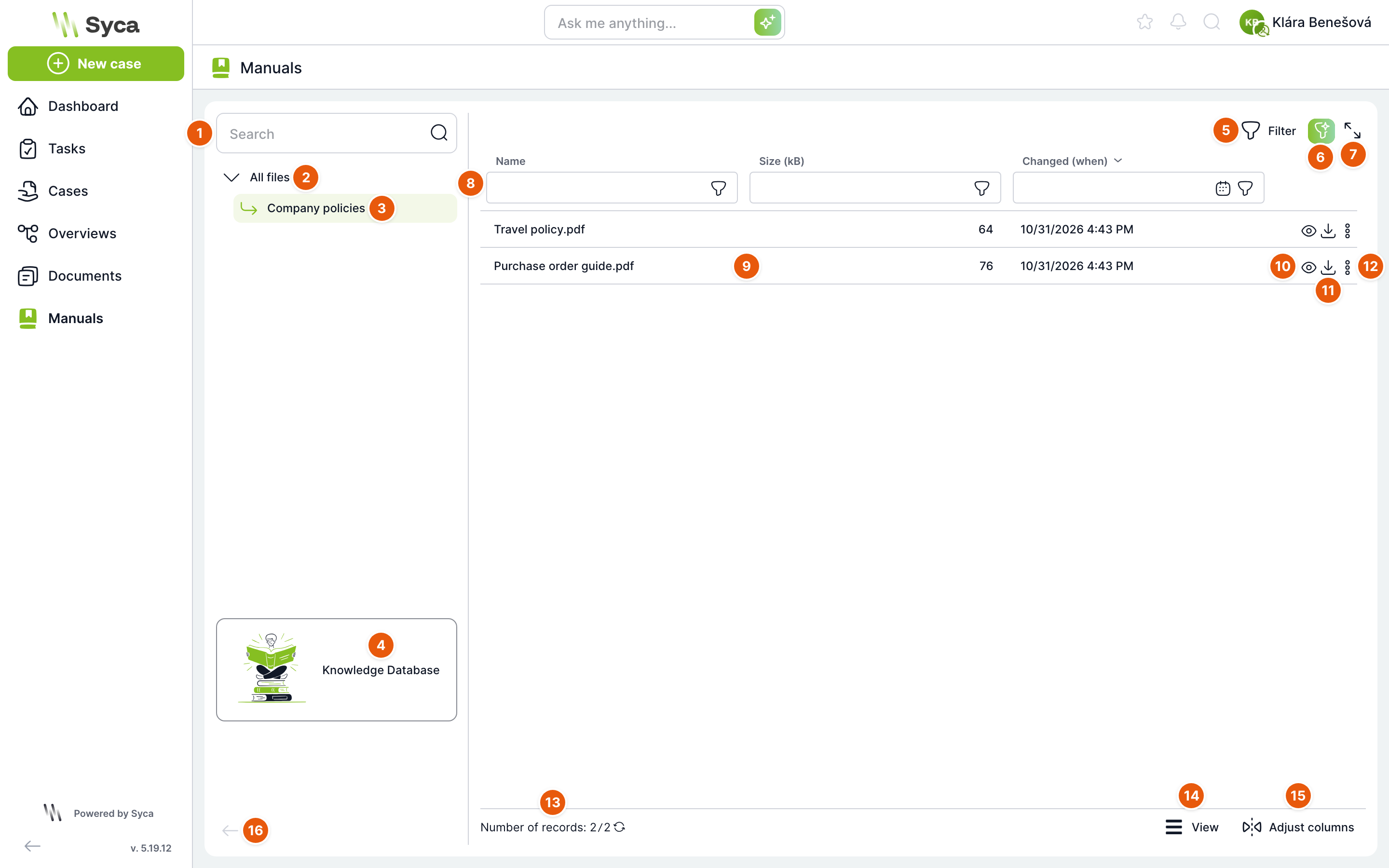
| No. | Element | Purpose |
|---|---|---|
| 1 | Search | Finds a folder in the folder tree by name. |
| 2 | All files | Shows files from all folders. |
| 3 | Folder | Click to show only the files in this folder. Use the arrow to expand or collapse the folder. |
| 4 | Knowledge Database | Link to the public TAS knowledge base with guides to the application. It opens in a new tab. In Czech or Slovak it opens the Czech version, and in all other languages the English version. |
| 5 | Filter | Shows or hides the row with column filters. |
| 6 | AI filter | Describe the filter in your own words and AI sets it up. Shown only in installations with AI enabled. |
| 7 | Maximize | Shows the table in full screen. |
| 8 | Column filters | Search by file name and filter by size and by modification date. |
| 9 | File | File name, size in kB and date of last modification. By default, files are sorted with the most recently modified first. |
| 10 | Preview | Opens a preview of the file in a new window. The icon is inactive for files that cannot be previewed. |
| 11 | Download | Downloads the file to your computer. |
| 12 | More actions | Copy path: copies the file path to the clipboard. |
| 13 | Record count | Number of files in the selected folder. Click the arrow to refresh the list. |
| 14 | Display settings | Height of the table rows. |
| 15 | Edit columns | Choose which columns to show and their order. |
| 16 | Collapse panel | Hides the folder panel to make more room for the table. |
On mobile devices the folder panel is hidden. To open it, tap the folder icon in the top right corner.
How to find and open a manual
- In the side menu, click Manuals.
- In the tree on the left, select a folder, for example Company policies.
- Click the eye icon next to the file. The preview opens in a new window.
- To save the file, click the download icon.
Files and folders are uploaded and managed by an administrator or a user with the DMS administrator role, in Administration under Shared files. These users also see an Add file button, a Visible column, and actions for deleting files and editing folders on the Manuals page. If a manual you need is missing, contact them.
Related: Interface overview, Documents.