General task settings and solver
The General tab in the task editor contains the task name and description, the solver definition and other settings. The solver is the person the system assigns the task to when the task is activated. This article describes the basic settings and all the ways to define the solver. Scheduling, permissions and visibility are described in the article Scheduling: start, branching and deadline.
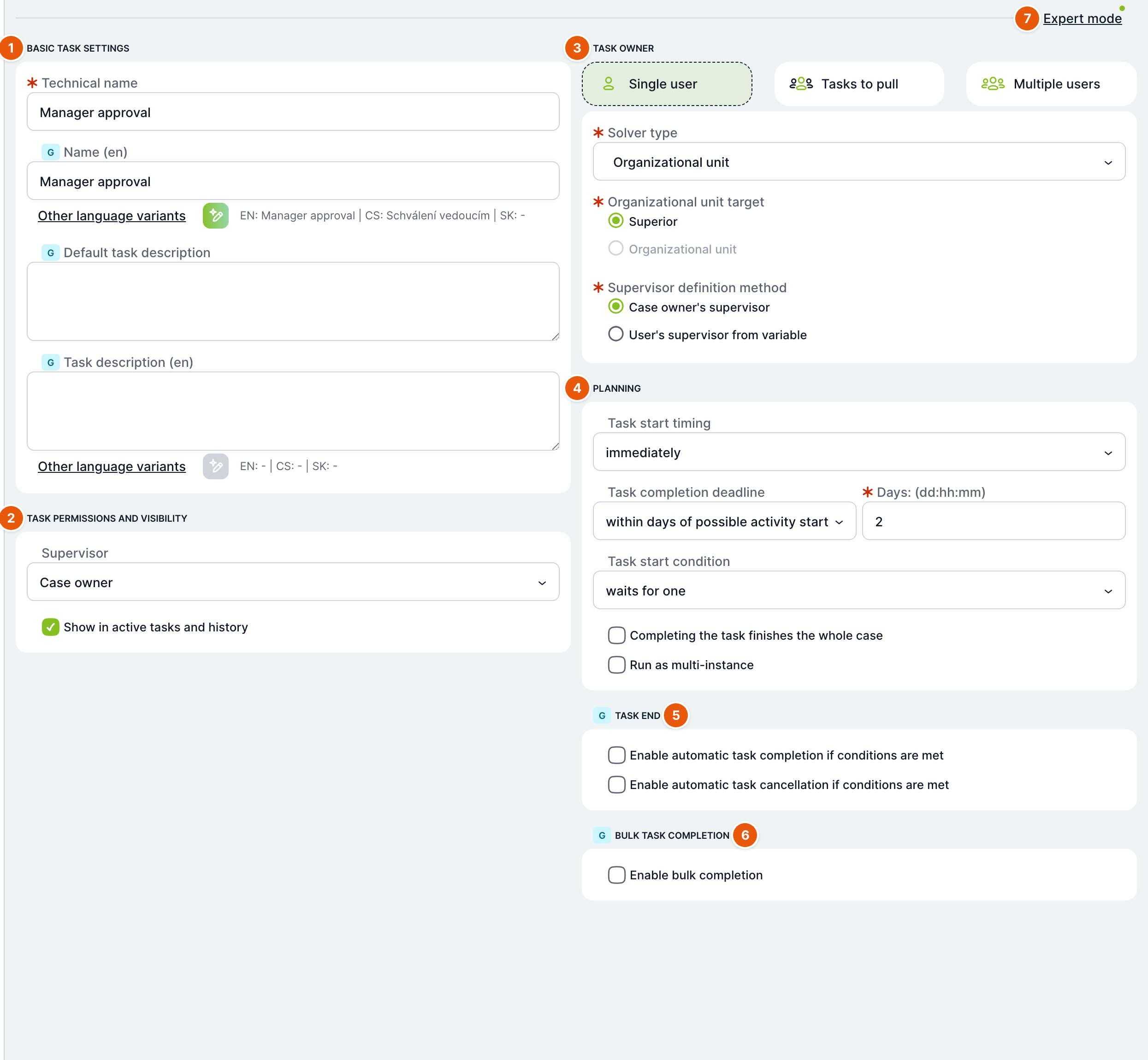
| No. | Section | Purpose |
|---|---|---|
| 1 | Basic task settings | Technical name, name in each language and task description. |
| 2 | Task permissions and visibility | Task supervisor and display in history. Expert mode only. |
| 3 | Task solver | Who the task is assigned to. Not available for automatic tasks and email notifications. |
| 4 | Scheduling | Timing, deadline, start condition, multi-instance. |
| 5 | Task completion | Automatic completion or cancellation based on conditions. Only for user tasks and events. |
| 6 | Mass task completion | Allows completing several tasks at once. Only for user tasks, in expert mode. |
| 7 | Expert mode | Shows or hides less frequently used settings. |
Basic task settings
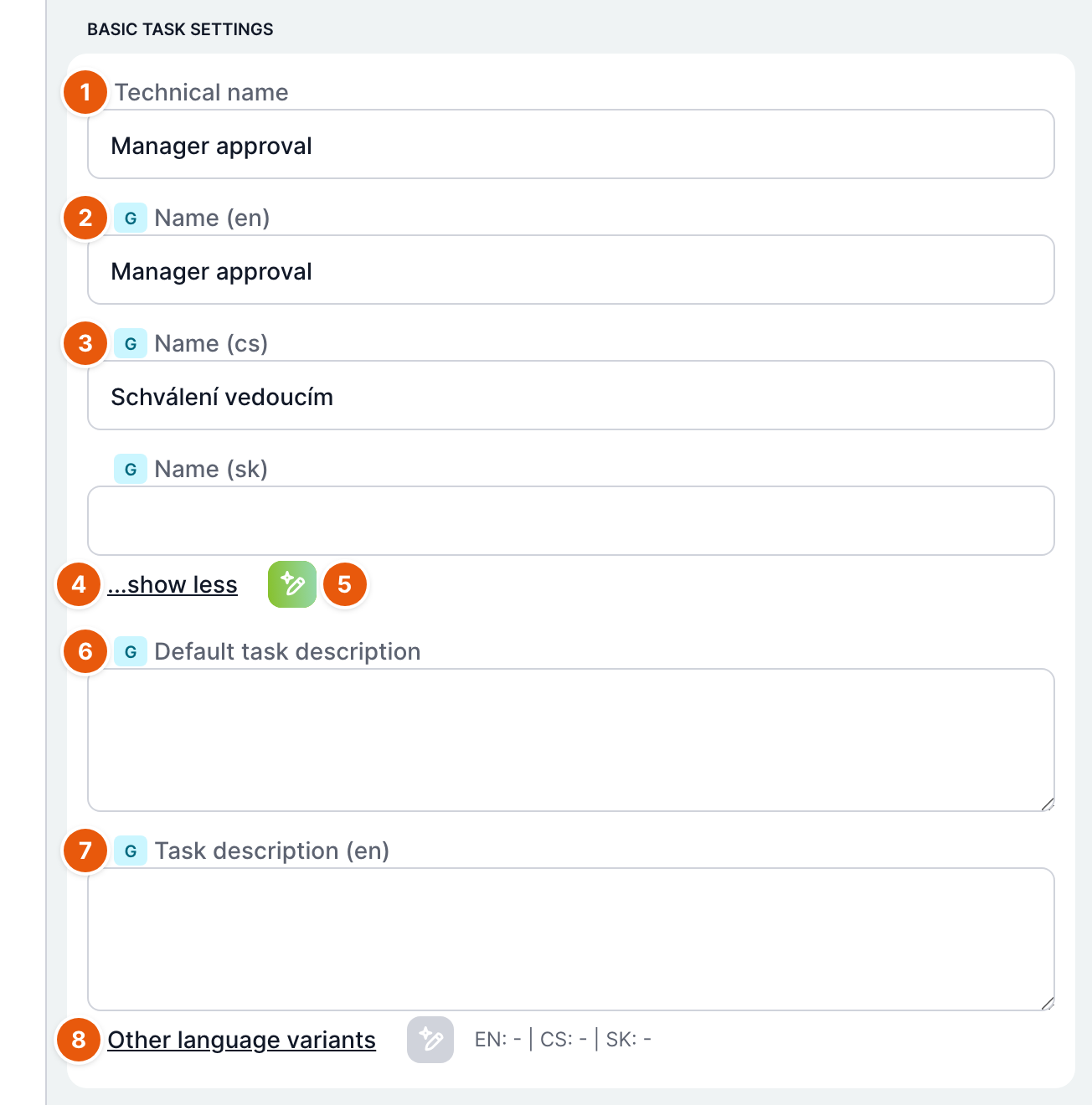
| No. | Field | Purpose |
|---|---|---|
| 1 | Technical name | The name by which calculations and expressions refer to the task, for example lastSolverOf("..."). Required. Users see it only when there is no name in their language. |
| 2 | Name (first language) | The name users see in the task list and in the form. This field is for the first language configured in the system. |
| 3 | Name (other languages) | The Other language variants link expands the fields for the other languages, and ...show less hides them again. When collapsed, the line after the link shows a preview of all languages. |
| 4 | ...show less | Hides the fields for other languages. |
| 5 | AI translation | The green button translates the text from the first field into the other languages. Visible only when AI is enabled in the system. |
| 6 | Default task description | The description shown to the solver in the task information when there is no description in their language. Expert mode only. |
| 7 | Task description (language) | Task description in individual languages. Expert mode only. |
| 8 | Other language variants | Expands the description fields for other languages. |
Save your changes with the Save or Save and close button in the editor header. A task cannot be saved without a technical name.
Task solver
The section consists of three cards and a solver type selection. The card determines how many people receive the task. The solver type determines where the solver comes from.
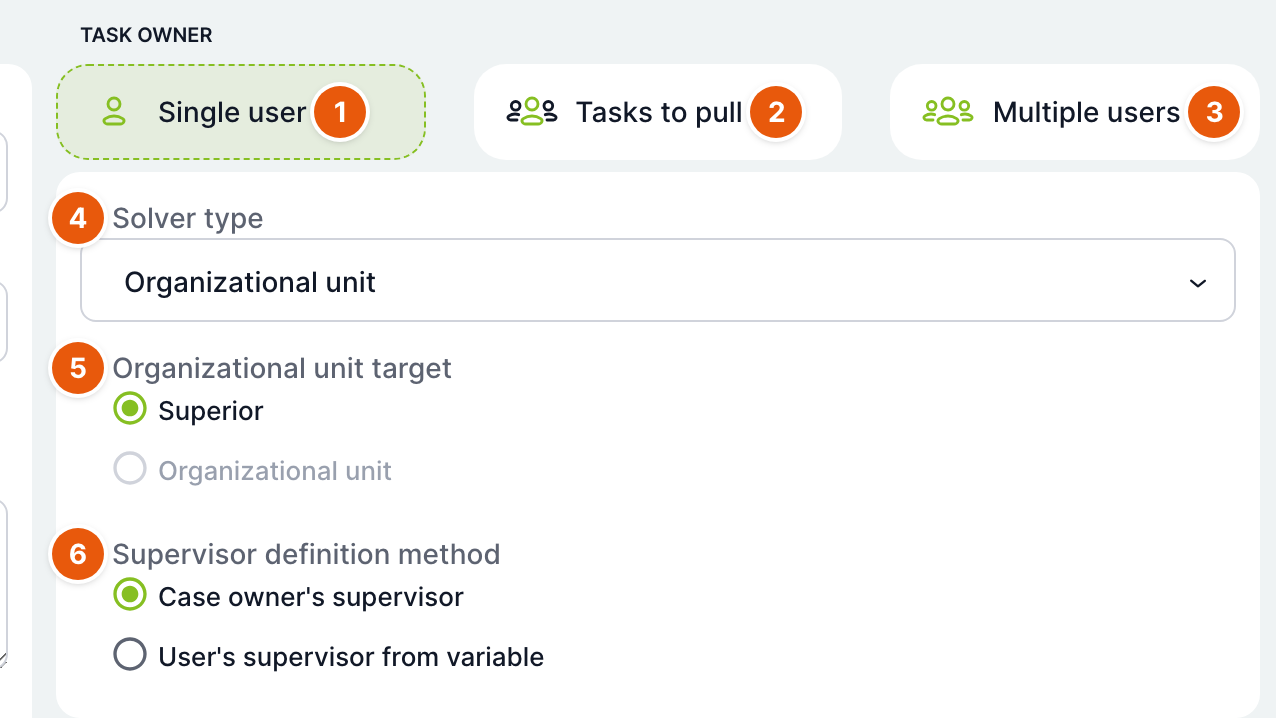
| No. | Element | Purpose |
|---|---|---|
| 1 | Single user | The task is given to one specific user. Offers all solver types. |
| 2 | To pull | The task is offered to a group of users and one of them takes it. Offers the Organizational unit, Role and Expert settings types. |
| 3 | Multiple users | Each user from the variable gets their own task. Offers the From variable and Expert settings types. This option enables multi-instance for the task. See the article Multi-instance. |
| 4 | Solver type | Where the solver comes from. Required. Additional fields appear below it depending on the type. |
| 5 | Target in organizational unit | For the Organizational unit type: Superior (for the Single user card) or Organizational unit (for the To pull card). |
| 6 | Superior definition method | For the Superior target: Superior of the case owner or Superior of the user from variable. |
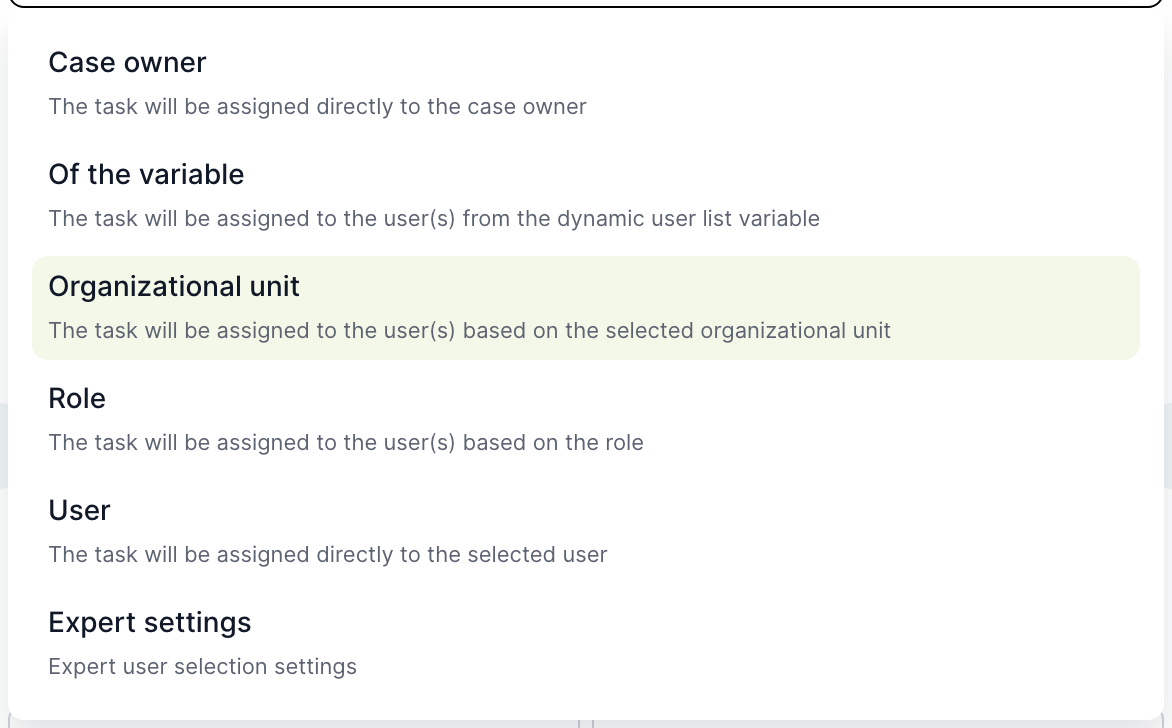
Solver types and how they are evaluated
| Solver type | Additional fields | Who the system selects when the task is activated |
|---|---|---|
| Case owner | none | The task supervisor. By default, this is the case owner. If you set a different supervisor in the Task permissions and visibility section, that person gets the task. |
| From variable (Single user) | Variable selection | The user stored in a variable of the dynamic user list type. If the variable contains several users, the first one gets the task. If it is empty, the supervisor gets the task. |
| From variable (Multiple users) | none | Each task instance gets the user it was created for. The task must be multi-instance with an iteration variable; otherwise the solver is evaluated as for the Case owner type. |
| Organizational unit, Superior of the case owner | none | The direct superior of the case owner. The system starts at the organizational unit from which the owner created the case, moves upwards and takes the first unit that has a manager whose manager is not the owner themselves. If no such superior exists, the supervisor gets the task. |
| Organizational unit, Superior of the user from variable | Variable selection | The same, but the starting person is the user from the selected variable. |
| Organizational unit, To pull | Direct organizational unit selection or Based on filter | The task is offered to all members of the unit and its manager. |
| Role, Single user | Direct role selection or Based on filter | A randomly selected user with this role. Only users assigned in the organizational structure are counted. |
| Role, To pull | Direct role selection or Based on filter | The task is offered to all users with the role. |
| User | Solver | The selected user. |
| Expert settings | see below | Based on the combination of reference person, relationship and assignment method. |
The help for the Role selection field states that the task goes to the first user in the role. In version 5.19, the system actually selects randomly among all users with the role. If the task should always go to the same person, use a role with a single member or the User type.
Task to pull
A task to pull has no solver. It is offered to all potential solvers in the task list, and those who have notifications for tasks to pull enabled receive an email. One of them takes the task with the Take over button and thereby becomes the solver. If there is only one potential solver, the system assigns the task to them directly. Calculations set to Before takeover run before the task is offered.
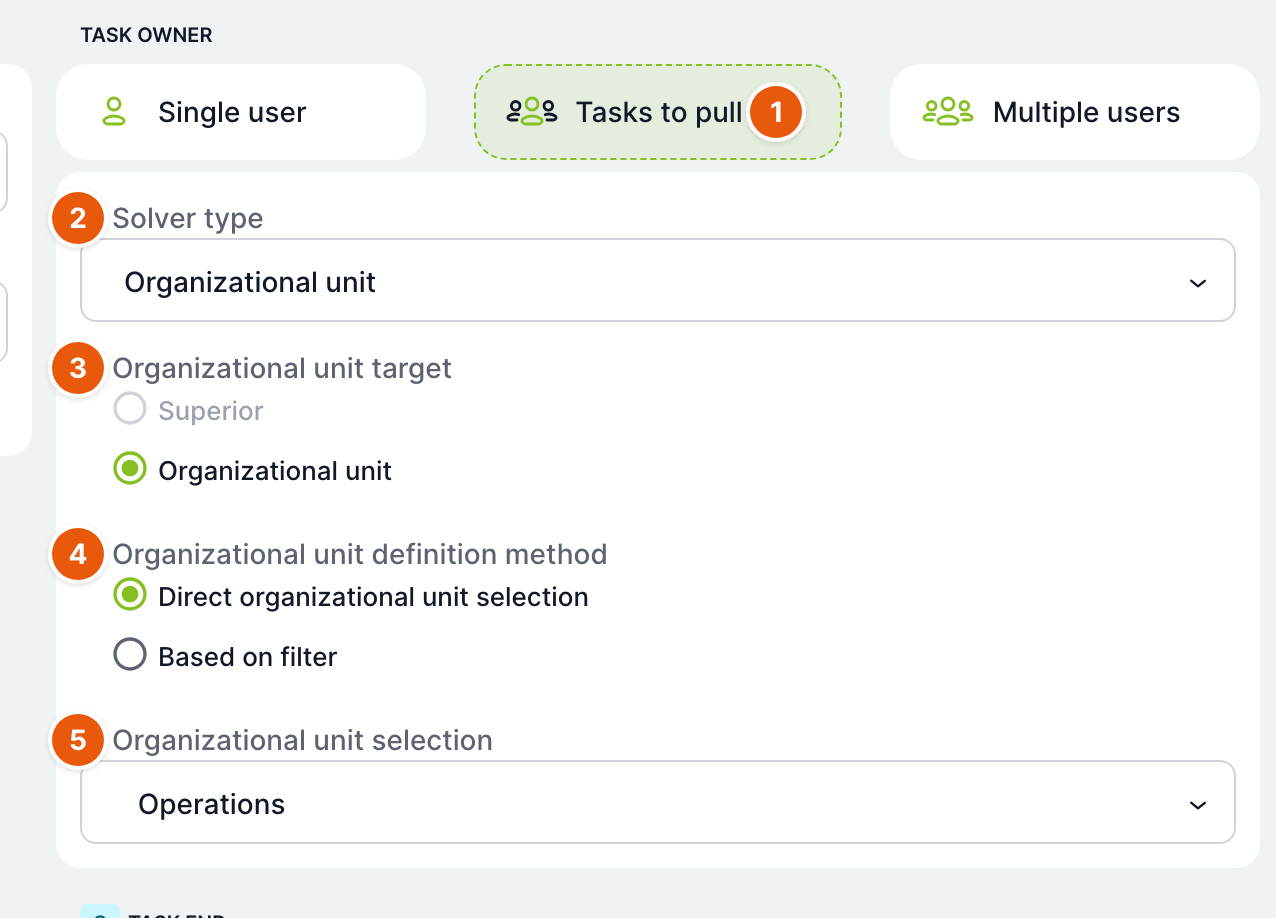
| No. | Field | Purpose |
|---|---|---|
| 1 | To pull | The selected card. |
| 2 | Solver type | Organizational unit, Role or Expert settings. |
| 3 | Target in organizational unit | For the To pull card, only the Organizational unit target is available. |
| 4 | Organizational unit definition method | Direct organizational unit selection or Based on filter. |
| 5 | Organizational unit selection | The unit whose members the task is offered to. |
Filter for a role or organizational unit
Instead of a specific role or unit, you can enter a Filter expression. When the task is activated, the system looks up the role or unit whose name matches the expression:
%stands for any number of characters,_for one character,^cancels the special meaning of the next character,{nazevPromenne}is replaced with the value of the case variable, for example{headerCode}-PO-{roleName}. The icon next to the field inserts a variable.
If several roles or units match the filter, only one is used and a warning is written to the log. If none matches, task activation ends with an error. Therefore, test the filter.
When a filter is used, Solver evaluation test appears below the section. In the Test value field, enter the text you expect in the role or unit name after the variables are substituted, and click Evaluate. The Potential solvers field shows users from roles or units whose name contains this text. The test value is not saved anywhere.
Expert settings
Expert settings build the solver from three parts: who the starting person is (reference person), how wide a circle of people around them is taken (relationship) and how the solver is selected from the circle (assignment method).
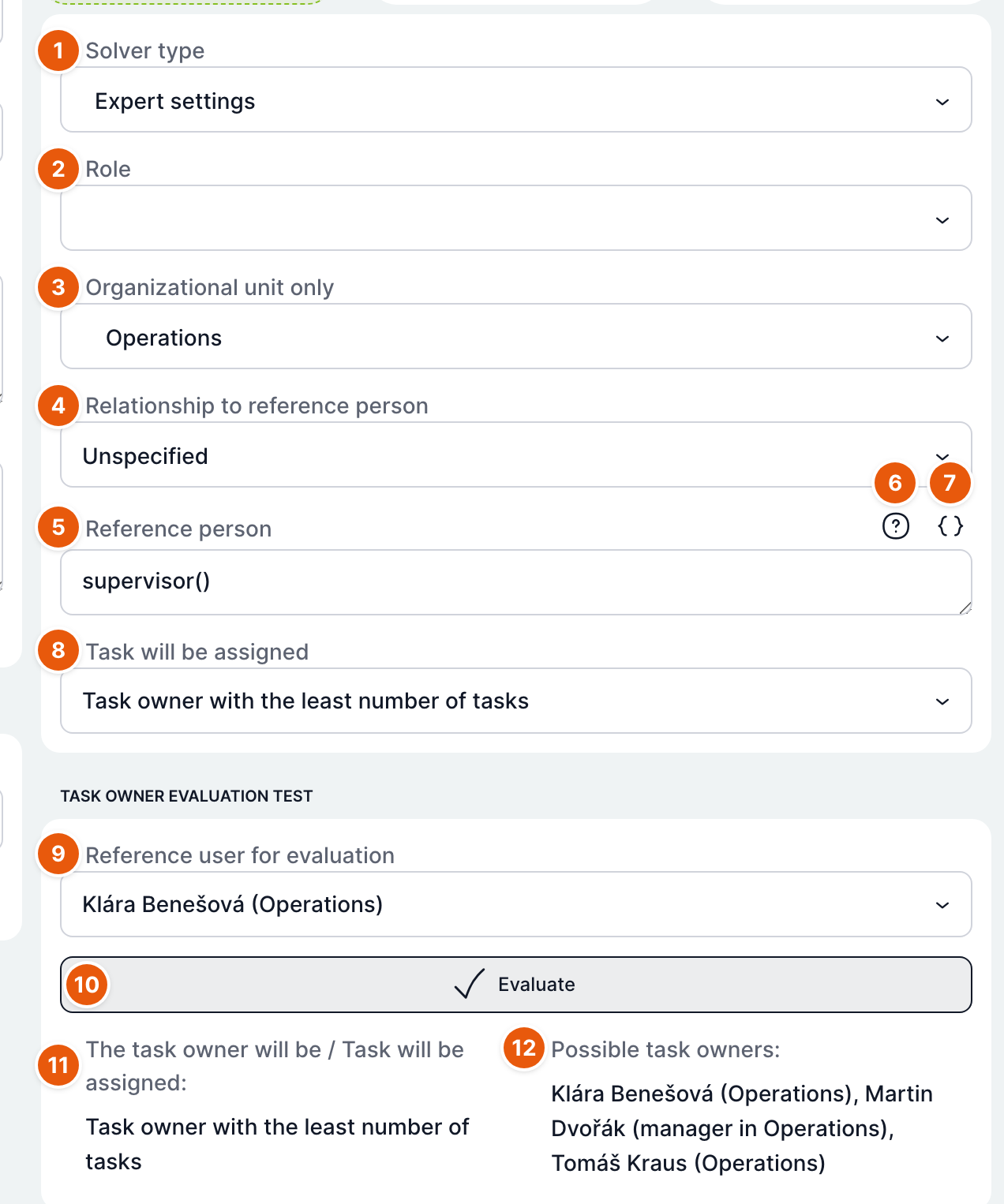
| No. | Field | Purpose |
|---|---|---|
| 1 | Solver type | Expert settings. |
| 2 | Role | Narrows the circle to users with this role. Active only for the automatic, fewest tasks and offer to a group assignment methods. For the Reference person only relationship, it is active only when offering to a group. |
| 3 | Organizational unit only | Narrows the circle to this unit. Active under the same conditions as Role. |
| 4 | Relationship to reference person | How wide a circle around the reference person is taken, see the table below. Active only for the automatic, fewest tasks and offer to a group assignment methods. |
| 5 | Reference person | An expression that determines the starting person. Required. The default value is supervisor(). |
| 6 | Help | Opens the help for expressions. |
| 7 | Insert expression | A menu of predefined expressions, see below. The selected expression is inserted at the cursor position. |
| 8 | Task will be assigned | The solver selection method, see the table below. |
| 9 | Reference person for evaluation | The user and their organizational unit for whom the test should be evaluated. Inactive for the Reference person only relationship and for methods where the circle does not matter. |
| 10 | Evaluate | Runs the test. Does not save anything. |
| 11 | Solver will be / Task will be assigned | A summary of how the solver is determined. |
| 12 | Potential solvers | Users who would belong to the circle, with their organizational unit. |
Reference person
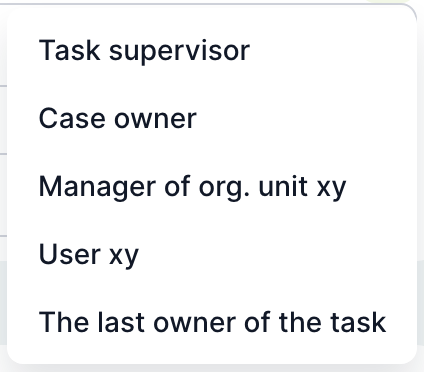
| Menu item | Expression | Meaning |
|---|---|---|
| Task supervisor | supervisor() | The task supervisor, by default the case owner. |
| Case owner | initiator() | The case owner. |
| Manager of org. unit xy | manager("xy") | The manager of the specified organizational unit. |
| User xy | user("xy") | The specified user. Replace xy with the user. The notation user({promenna}) takes the user from a variable. |
| Last solver of task | lastSolverOf("xy") | The person who last solved the task with the technical name xy. |
If the expression cannot be evaluated, the task supervisor is used.
Relationship to reference person
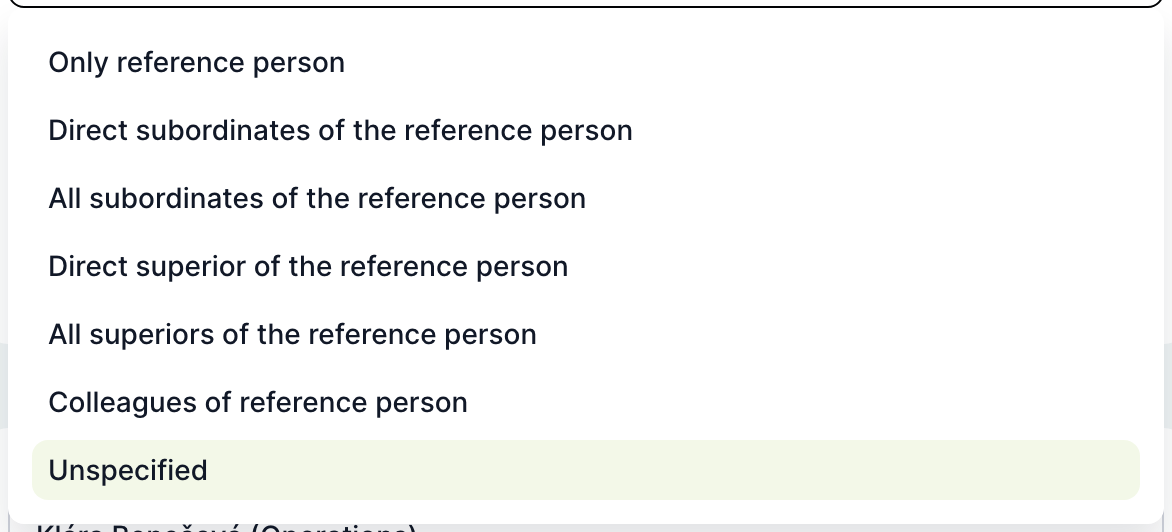
| Relationship | Circle of potential solvers |
|---|---|
| Reference person only | Only the reference person. |
| Direct subordinates of the reference person | Members of the organizational unit managed by the reference person, excluding the reference person. |
| All subordinates of the reference person | Members and managers of their unit and all subordinate units, excluding the reference person. |
| Direct superior of the reference person | The manager of the nearest higher unit who is not the reference person. |
| All superiors of the reference person | Managers of all superior units up to the root of the structure. |
| Colleagues of the reference person | Other members of their organizational unit. |
| Unspecified | All users assigned in the organizational structure. Usually narrowed down with the Role or Organizational unit only field. |
Only active users are counted in the circle.
Task will be assigned
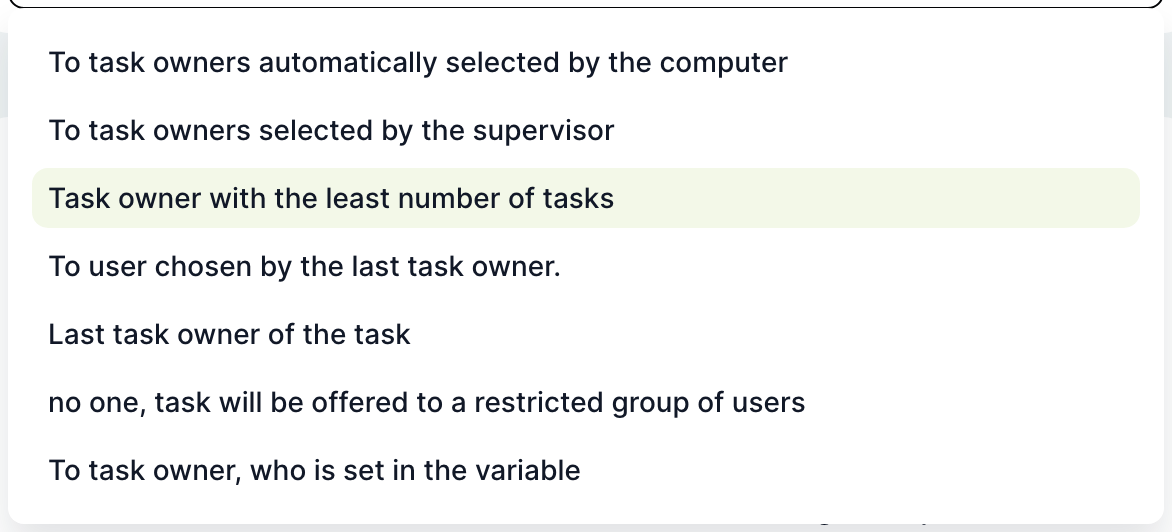
| Method | What happens when the task is activated |
|---|---|
| To a solver selected automatically by the computer | For the Reference person only relationship, the reference person gets the task. Otherwise, the system randomly selects one user from the circle. If the circle is empty, the supervisor gets the task. |
| To a solver selected by the supervisor | The task remains without a solver and waits. The supervisor receives an email if they have notifications for new tasks enabled, and assigns the task solver. |
| To the solver with the fewest tasks | Selects the user from the circle with the fewest active tasks. In case of a tie, the choice is random. |
| To a user selected by the last solver of a task | The task waits without a solver. The solver is selected by the person who last completed the task chosen in the Task field. |
| To the last solver of a task | The task goes to the person who last completed the task chosen in the Task field in this case. If there is no such person, the supervisor gets the task. |
| To nobody, it will be offered to a defined group of users | A task to pull. It is offered to the entire circle; the relationship is treated as Unspecified. |
| To the solver specified in a variable | The task goes to the user from the variable in the Variable field. With multiple users, the first one; with an empty variable, the supervisor. |
Whenever the solver cannot be determined, for example when the user from the variable does not exist or the circle is empty, the task supervisor gets the task. If you do not set a supervisor, it is the case owner.
Mass task completion
In expert mode, you can select Allow mass task completion for a user task. The task can then be completed together with other tasks of the same type at once. The Variables for mandatory write and Variables for write fields determine which variables the user fills in during mass completion. A variable cannot be in both fields. The mass completion procedure is described in the article Bulk tasks.
How to set up approval by a superior
- Open the task and stay on the General tab.
- In the Task solver section, keep the Single user card.
- As Solver type, select Organizational unit.
- Leave Target in organizational unit set to Superior and Superior definition method set to Superior of the case owner.
- Click Save.
In the sample template “Travel request”, this way the Manager approval task goes to the head of the department from which the employee created the request.
Related: Task types, Scheduling: start, branching and deadline, Multi-instance, Bulk tasks.