Dynamic Conditions: Script
The Script tab in the Conditions window (see Dynamic Conditions: Builder) contains the complete JavaScript code of the task's dynamic conditions. It runs in the user's browser while the form is being filled in, unlike the calculations on the Calculations tab, which run on the server. This article is a reference of the functions, variables and validations available to the script in TAS 5.19.12. Switching between the Builder and the Script is described in the article Dynamic Conditions: Builder.
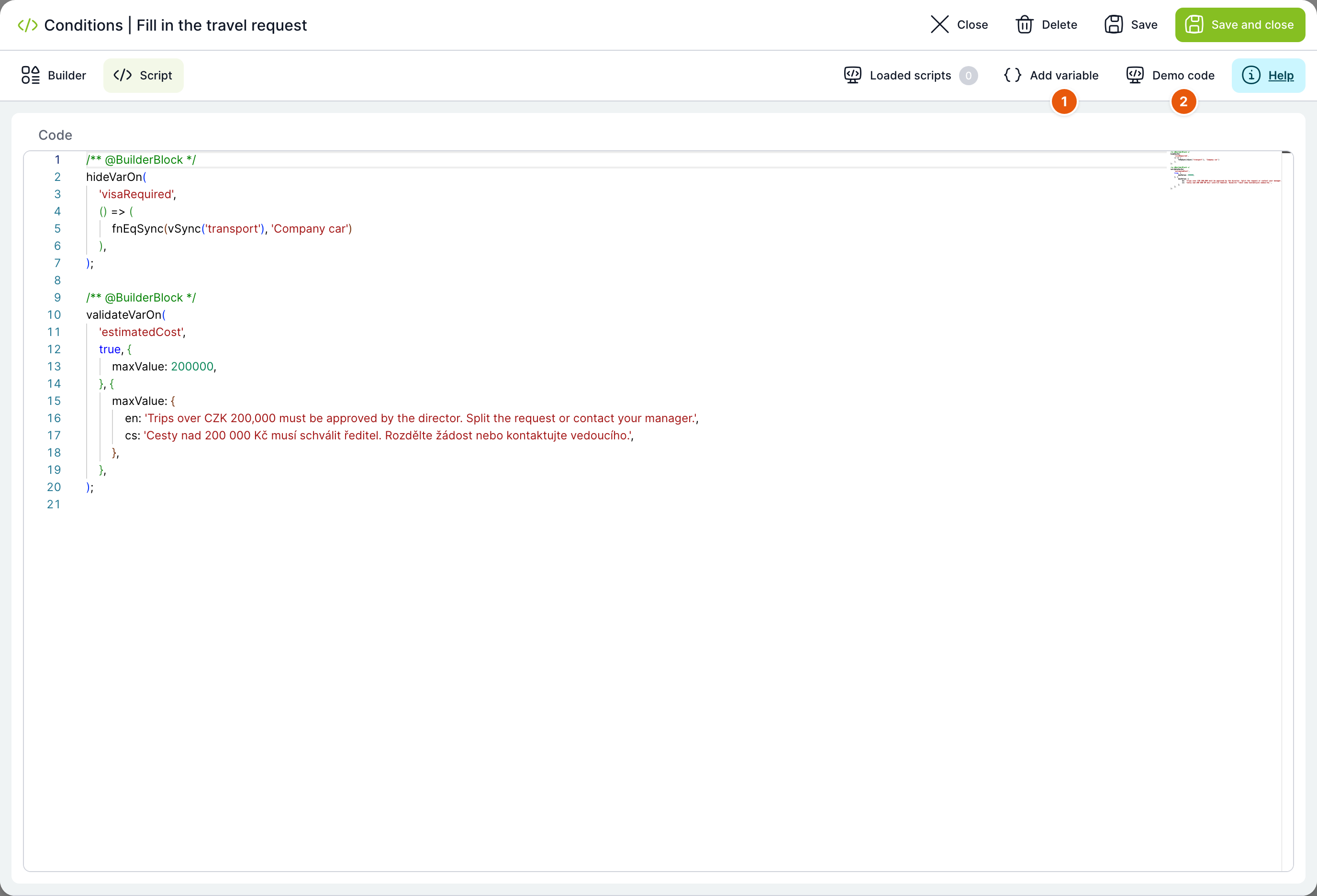
Form context
| What | How to get it |
|---|---|
| Context of the current task | const currentTask = getCurrentTask(); – contains currentTask.items (task variables with their initial values from the database), currentTask.processVars (case variables), currentTask.state.taskInfo (task name, owner, solver and header) and currentTask.language. |
| References to form components | const references = getReferences();, or currentTask.references. Used, for example, to find out whether the user has already changed a variable: references['tvar_name'].isPristine(). |
| Current form language | getLanguage() or currentTask.language. |
| Dynamic table data | getDynTable(dtId, dtcId) loads column dtcId of table dtId (or its name) into dynTable[dtId]. The call is asynchronous; the script waits for it to finish before continuing. |
For calling backend services (Api.request.get/post/...), the REST API documentation is available; for general helper functions, the Lodash library – both are linked from the script help (the Help button).
Main functions
| Function | Signature | Description |
|---|---|---|
hideVarOn | (tvar_name, condition, watchVars?, returnToPreviousState?) | Hides the variable tvar_name if condition is met. |
varReadOn | (tvar_name, condition, watchVars?, returnToPreviousState?) | Switches the variable to read-only mode. |
varMustOn | (tvar_name, condition, watchVars?, returnToPreviousState?) | Makes the variable mandatory. |
varWriteOn | (tvar_name, condition, watchVars?, returnToPreviousState?) | Switches the variable to write mode. |
changeVarVal | (tvar_name, condition, value, watchVars?, force?, returnToPreviousState?) | Sets the variable to a new value value (a value, or a function/promise that returns it). |
varDefOn | (tvar_name, condition, definition, watchVars?) | Changes the variable definition (e.g. tvar_meta, the dynamic list filter, the field colour). |
onChangeVar | (tvar_name, callback) | Calls callback(tvar_name, index) when the variable changes. |
solveTaskOn | (tvar_name, condition, watchVars?) | If condition is not met, the task cannot be completed. Unlike validateVarOn, it also applies to read-only variables. |
validateVarOn | (tvar_name, condition, validations, validationErrors, watchVars?) | Adds custom validations with messages to the variable. Does not apply to read-only variables. |
repeatScript | () | Manually re-runs the entire script. |
In all functions, tvar_name is either a variable name or an array of names (a bulk action for several variables at once). condition is either a plain value (evaluated only when the form loads) or a function returning a value (recalculated dynamically). watchVars limits script recalculation to changes of the listed variables only. returnToPreviousState (default false) determines the state the variable returns to when the condition no longer applies: false returns it to the default/database state, true to the state before the function last ran.
// Skryje pole Visa required, pokud je dopravním prostředkem služební auto
hideVarOn('Visa required', function() {
    return vSync('Means of transport') == 'Company car';
});

// Objednávka nad 200 000 Kč nejde dokončit
solveTaskOn('Estimated cost', function() {
    return vSync('Estimated cost') <= 200000;
});

// Dohledá jméno dodavatele podle ID z číselníku
changeVarVal('SupplierName', fnIsNotEmptySync(v('SupplierId')), function() {
    var supplierId = vSync('SupplierId');
    return Api.request.get('/dyn-table/12/values/' + supplierId)
        .then(function(row) { return { value: supplierId, title: row.col_1 }; })
        .catch(function() { return { title: null, value: null }; });
});Validation messages are stored in the code in single quotes. Do not use an apostrophe in them; it could break the conditions code.
Reading variable values
| Function | Description |
|---|---|
v(tvar_name) | Value of a task variable. Outside a function/condition, it works only at the moment the form loads – for dynamic recalculations, use vSync. |
vSync(tvar_name) | The same, but also valid inside functions that are recalculated dynamically. |
vObj(tvar_name) / vSyncObj(tvar_name) | For selection-type variables, returns a {title, value} object instead of the value alone. |
procV(tvar_name) / procVSync(tvar_name) | Value of a case variable (not of the current task). |
procVObj(tvar_name) / procVObjSync(tvar_name) | Same as vObj, but for a case variable. |
Comparison and helper functions
| Function | Description |
|---|---|
fnEq(value1, value2) / fnEqSync(...) | value1 === value2. |
fnNe(value1, value2) / fnNeSync(...) | value1 !== value2. |
fnEqArray(value, array) / fnNeArray(value, array) (+ Sync) | true if value equals (does not equal) at least one value in the array. |
fnGt, fnGe, fnLt, fnLe (+ Sync) | Comparison >, >=, <, <=. Arguments can also be functions. |
fnLike(value1, value2) / fnNLike(...) (+ Sync) | value1 contains/does not contain value2. |
fnIsEmpty(value) / fnIsNotEmpty(value) (+ Sync) | The value is/is not undefined, null, '', [] or {}. |
fnAnd(...) / fnOr(...) (+ Sync) | Logical AND/OR of any number of values or functions. |
jsonSumArray(json, pathInJson) (+ Sync) | Sum of the numbers in an array inside JSON, by path, e.g. obj.arr. |
formatEmails(emails) (+ Sync) | Formats an array of e-mails as semicolon-separated text – typically combined with changeVarVal(..., force=true). |
canSolveTask(bool) | With false, greys out the task completion buttons (similar to solveTaskOn, but not tied to a specific variable). |
Validations (validateVarOn)
| Validation | Value | Checks |
|---|---|---|
isExisty | true | Neither null nor undefined. |
isEmptyString | true | Empty string. |
isEmail / isEmails | true | E-mail, or e-mails separated by semicolons. |
isUrl | true | Valid URL. |
isTrue / isFalse | true | value === true / value === false. |
isNumeric / isInt / isFloat | true | Number, integer, decimal number. |
isAlpha / isAlphanumeric / isWords / isSpecialWords | true | Letters only / letters and digits / with spaces / including diacritics. |
isLength | number | Exact text length. |
minLength / maxLength | number | Minimum/maximum length. |
minValue / maxValue | number | Minimum/maximum value. |
isLowerThan / isHigherThan / isLowerOrEqualThan / isHigherOrEqualThan | number, date | Comparison with a value or date. |
isDate | value | Valid date according to the locale. |
isIC | true | Company identification number (IČO). |
isTelephoneNumber | true | Telephone number. |
isPath | true | File path. |
matchRegexp | regular expression | Test against any regex. |
equals / equalsField | value / variable name | Equality with a constant, or with another variable. |
isValid | boolean | Any custom condition – with false, the message is displayed. |
validateVarOn('ReturnDate', true, function() {
    return { isHigherThan: vSync('DepartureDate') };
}, { isHigherThan: { cs: 'Datum návratu musí být po datu odjezdu.', en: 'Return date must be after the departure date.' } });
Relationship to the builder
The builder and the script store one shared code. A builder block is written as a function call with the comment /** @BuilderBlock */ above it; a disabled block is additionally marked @BuilderInactive and remains in the code as a comment. When you switch to the Builder tab, the application converts these marked calls back into blocks – code between them that the builder does not understand is displayed as a Script block. If you write something into a marked call that the builder can no longer convert back, you stay on the Script tab with the message Script conversion to builder failed. Details and an example are in the article Dynamic Conditions: Builder.
Related: Dynamic Conditions: Builder, Dynamic Rows: Script, Calculations on a Task.