- License
- Global LOVs - removal of lib.setList()
- Template versioning
- Moving FE server files to the backend
- Removal of curl — switch to Axios, FTP and SFTP functions
- Removal of functions for working with secrets
- End of support for the EWS cron in TAS 5.17
- Steps before the upgrade
- Dynamic conditions - changeVarVal for dynamic tables
- Formatting changes in CaseVariablesTab
- Authentication for third-party API calls – switch to B2B token
- Local account passwords (upgrading from a version older than 4.15)
- Removal of identUser in authentication modules
- Removal of SharePoint API
- Removal of the SOAP connector in events
- ISDOC as a plugin
- Removal of Cron.js — switch to PostponedTaskCron
- Removal of the storeCsvFromDms function
- Removal of CleanPerfLogsCron - replaced by CleanupCron
- getPdfFileAnnotations function as a plugin
- Removal of unused database tables
- Data restrictions in api/users
Upgrade to TAS 5.17 - Key Changes and Removed Features
- License
- Global LOVs - removal of lib.setList()
- Template versioning
- Moving FE server files to the backend
- Removal of curl — switch to Axios, FTP and SFTP functions
- Removal of functions for working with secrets
- End of support for the EWS cron in TAS 5.17
- Steps before the upgrade
- Dynamic conditions - changeVarVal for dynamic tables
- Formatting changes in CaseVariablesTab
- Authentication for third-party API calls – switch to B2B token
- Local account passwords (upgrading from a version older than 4.15)
- Removal of identUser in authentication modules
- Removal of SharePoint API
- Removal of the SOAP connector in events
- ISDOC as a plugin
- Removal of Cron.js — switch to PostponedTaskCron
- Removal of the storeCsvFromDms function
- Removal of CleanPerfLogsCron - replaced by CleanupCron
- getPdfFileAnnotations function as a plugin
- Removal of unused database tables
- Data restrictions in api/users
This article describes the transition to TAS 5.17. Before starting the upgrade, you must go through the migration documentation of previous versions.
Version 5.17 brings a number of new features for administrators, which are described in the Business changelog.
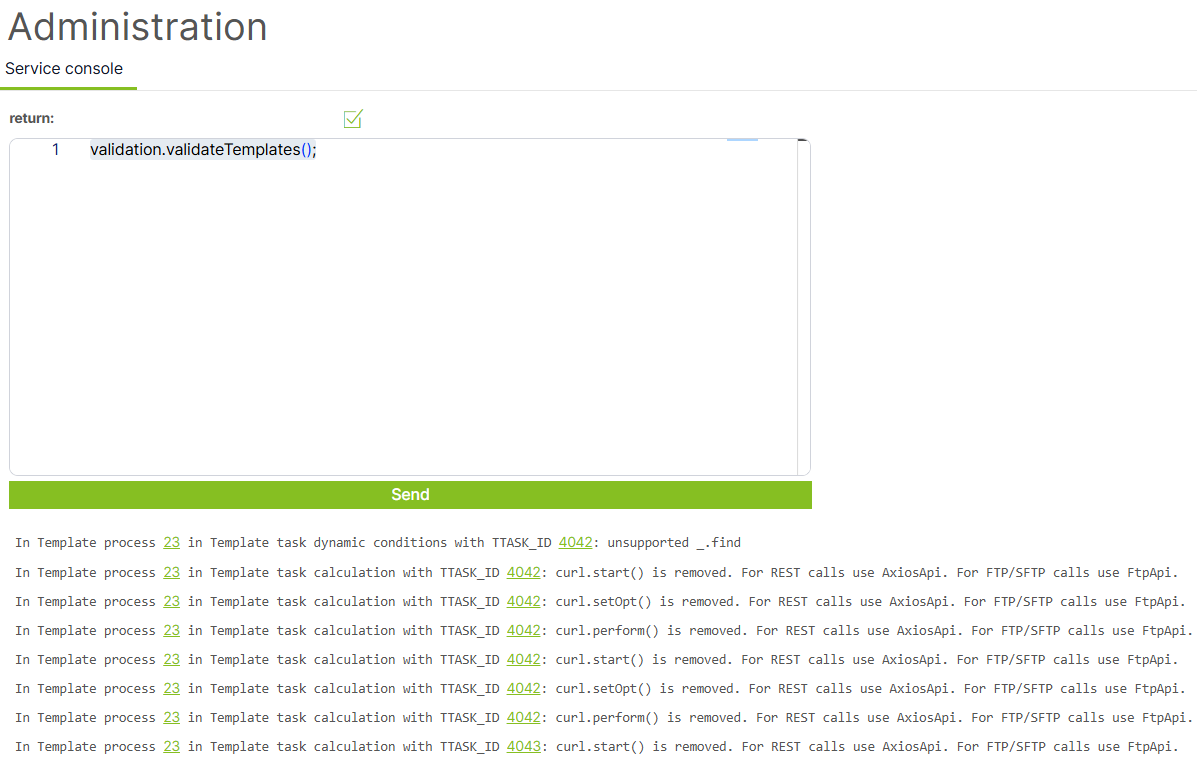
validation.validateTemplates(); in the service console.This function lists all usages of incompatible calculations and functions across all templates.
Note: the validation plugin must be installed in the environment for this to work.
License
Starting with version 5.17, a valid license is required for editing templates. Without a license, the system is fully functional, but templates cannot be edited.
You can obtain a license in two ways:
- by contacting your contact person at Neit Group,
- by submitting an online request at teamassistant.app.
Once you receive the license, enter it in the Administration section.
Global LOVs - removal of lib.setList()
Starting with version 5.17, all text LOVs (lists of values) are global (template-level), so any change to a LOV is reflected in all running cases (except for multi-instance tasks that have already been generated).
Solutions that rely on the setList() function must therefore be rewritten to use a dynamic table, or the LOVs can be "restricted" using dynamic conditions on the form.
Template versioning
Template versioning has been removed from the platform. This change affects the URL structure — if third parties or consultant code call template endpoints directly, they must be updated.
|
Original format |
New format |
|
|
|
|
|
|
Moving FE server files to the backend
Files such as manuals, logos and other assets are no longer stored on the FE server — they have been moved to the backend. The default folders have also changed.
A detailed manual for DevOps is available here.
Folder mapping changes:
|
Asset type |
Original location |
New root |
|
Schema logos |
|
|
|
Organization logos |
|
|
React prints and Case Overview — use the new getAsset() function:
The original direct link to logos or other public documents will no longer work.
getAsset(root: 'manuals' | 'logos' | 'org' | 'schema', path: string)
Example usage:
  //Before - v5.7
  <PrintFooter logoURL="/assets/logos/logo_element_horizontal.png" />
  //After - v5.17
  <PrintFooter logoURL={getAsset('logos','logo_element_horizontal.png')} />

//Before - v5.7
 <img alt="someImg" src="/assets/logos/logo_element_horizontal.png" />
//After - v5.17
<img alt="someImg" src={getAsset('logos','logo_element_horizontal.png')} />
//Before - v5.7
 <img id="top-logo" src={getVar('_logo')} alt="Logo" />
//After - v5.17
<img id="top-logo" src={getAsset('logos',getVar('_logo'))} alt="Logo" />
Legacy (HTML) prints — the getAsset() function is not available. Enter the new asset download service URL directly:
//If the logo is stored directly in logos (not in a subfolder)
<img alt="someImg" src="https://<backendUrl>/api/assets/download?root=logos&path=workflow.png" />

//If the logo is nested in a folder, you must specify the path
<img alt="someImg" src="https://<backendUrl>/api/assets/download?root=logos&path=folder/workflow.png" />
Working with shared files in calculations (backend)
In a calculation, a shared file is loaded from its absolute path using lib.getFileContents() and saved to the case DMS using lib.storeAttachment().
The following example attaches the terms and conditions from the Documents tab as an attachment to the current case:
// Shared file: Administration → Shared files → Documents
const SHARED_ROOT = '/app/tas/storage/assets/documents';
const SOURCE_FILE = `${SHARED_ROOT}/terms-and-conditions.pdf`;
const TARGET_NAME = 'Terms and Conditions.pdf';

try {
  const content = lib.getFileContents(SOURCE_FILE, 'base64');
  const dmsId = lib.storeAttachment(TARGET_NAME, content, false);
  proc.info('Shared file attached to case', { caseId: lib.iprocId(), dmsId });
} catch (err) {
  proc.error('Failed to attach shared file', { file: SOURCE_FILE, err: err.message });
  debug.error('Failed to attach the document to the case.');
}
Removal of curl — switch to Axios, FTP and SFTP functions
The curl tool has been removed from the platform. Calculations and scripts that used it to communicate with external systems must be modified.
HTTP and HTTPS requests now use Axios, which provides a unified interface for calling REST APIs, setting headers and query parameters, working with responses and handling errors. For file transfers over FTP and SFTP, dedicated functions have been created for connecting to a server, uploading, downloading and other file operations.
curl and replace them with the corresponding Axios calls or FTP/SFTP functions, depending on the integration type.Removal of functions for working with secrets
lib.setSecret(), lib.getSecret() and lib.getPublicKey() have been removed from calculations. Calculations and scripts that use them will stop working – they must be rewritten to use the Vault.For working with secret values (service tokens, API keys, passwords, certificates), calculations now use the Vault exclusively. Secrets are created and managed in Administration → Vault and are loaded into a calculation by calling vault.get('SECRET_NAME'). The function does not return the secret value as text, but an opaque reference VaultSecretRef, which cannot be serialized or logged – any output shows only [VaultSecretRef]. Pass the reference only to the designated methods: setVaultHeader(), setVaultQueryParam(), requestWithVaultField(), requestRawWithVaultField(), applySslConfig() and ftp.getFtpClientWithVaultPassword(). This way, the secret value never passes through the calculation code or the template export.
const tokenRef = vault.get('EXTERNAL_API_TOKEN');
const client = axios.getAxios({ baseURL: apiUrl }).setVaultHeader('Authorization', tokenRef, 'Bearer ');
More information on using the Vault with Axios calls can be found here.
End of support for the EWS cron in TAS 5.17
Starting with TAS 5.17, the cron for processing mailboxes via EWS (Exchange Web Services) — EwsCreateProcessesFromMailCron — is no longer supported. The reason is that Microsoft is ending support for EWS. It is replaced by the MS Graph cron — MsGraphCreateProcessesFromMailCron.
MsGraphCreateProcessesFromMailCron. You can reuse the folder logic from the original EWS configuration; however, the credentials and folder IDs must be obtained again via MS Graph (the original EWS folderId values are not compatible with MS Graph).Steps before the upgrade
- In Administration, open the
EwsCreateProcessesFromMailCroncron. - Copy the entire JSON configuration of the cron to a secure file outside TAS. You will need this backup to set up the new MS Graph cron.
- Set the EWS cron to inactive - if it remains active, the upgrade will fail.
- Only then start the upgrade to version 5.17.
Dynamic conditions - changeVarVal for dynamic tables
If the value [null] is inserted into a dynamic table via changeVarVal (this is used mainly in the invoice template), this notation is no longer valid and will not pass backend validation. It must be changed to an empty array [].
Formatting changes in CaseVariablesTab
In the CaseVariablesTab component, the way Grid items are written must be updated. The original notation used separate props (xs, sm, md, lg, xl); the new notation requires merging them into a single size prop containing an object of values.
Original notation:
<Grid item xs={row[index+1] === '' ? 12: (maxLength >= 4 ? 6 : 12)} sm={3} md={row[index+1] === '' ? (maxLength >= 4 ? 6 : 8) : (maxLength >= 4 ? 3 : 6)} lg={row[index+1] === '' ? (12/maxLength)*2 : 12/maxLength} xl={row[index+1] === '' ? (12/maxLength)*2 : 12/maxLength} key={index}>
New notation:
<Grid
  item
  size={{
    xs: row[index + 1] === '' ? 12 : (maxLength >= 4 ? 6 : 12),
    sm: 3,
    md: row[index + 1] === '' ? (maxLength >= 4 ? 6 : 12) : (maxLength >= 4 ? 3 : 6),
    lg: row[index + 1] === '' ? (12 / maxLength) * 2 : 12 / maxLength,
    xl: row[index + 1] === '' ? (12 / maxLength) * 2 : 12 / maxLength,
  }}
>
size prop. Without this change, cells are formatted incorrectly — the data is squeezed together.Authentication for third-party API calls – switch to B2B token
Starting with version 5.17, logging in with a username and password is no longer supported for API calls from third parties to TAS. Authentication is performed exclusively via a B2B API token, which is issued in TAS administration.
ApiTokenAdministrator role manages only their own tokens. In combination with the SuperAdministrator role, they can manage the tokens of all users.How to issue a token is described here.
Example call
GET /api/processes HTTP/1.1
Host: <your-tas-server>
Authorization: Bearer <your-b2b-token>
Local account passwords (upgrading from a version older than 4.15)
This section applies only to environments upgrading from a version lower than 4.15.
Removal of identUser in authentication modules
The identUser function is no longer supported in authentication modules. Use postAuthInstructions exclusively instead.
Configuration details for authentication modules are described in the article Authentication module configuration.
Removal of SharePoint API
The SharePoint API has been removed because Microsoft has ended its support. All SharePoint integrations must be reworked to use the MS Graph API. Development support is available if needed.
Removal of the SOAP connector in events
The SOAP connector has been removed from events. All connections to external systems can be implemented via the Axios API.
ISDOC as a plugin
The ISDOC feature is now available only as a plugin. Environments that use ISDOC must have the corresponding plugin installed.
Removal of Cron.js — switch to PostponedTaskCron
The original Cron.js for running scheduled tasks has been removed. It is replaced by PostponedTaskCron, which offers more configuration options and can be cloned.
PostponedTaskCron has been available since version 5.7. A detailed description of its settings can be found in the article PostponedTaskCron — configuration.Removal of the storeCsvFromDms function
The lib.storeCsvFromDms() function has been removed.
Removal of CleanPerfLogsCron - replaced by CleanupCron
CleanPerfLogsCron has been completely removed in version 5.17. Its function has been taken over by CleanupCron.
getPdfFileAnnotations function as a plugin
The getPdfFileAnnotations function has been moved to a plugin. If templates use it, the environment must have the corresponding plugin installed.
Removal of unused database tables
The following database tables have been removed:
List of removed tables
ADDITINOAL_OBJECT_INFO
DMS_ACCESS_DIMENSIONS
DMS_ACCESS_RULE
DMS_ACCESS_SUBJECT
DMS_FILES
DMS_INDEX_QUEUE
DMS_WEBDAV_PATH
DYNAMIC_LIST
DYNAMIC_LIST_COLS
DYNAMIC_LIST_LIST
DYNAMIC_LIST_VALUES
GOOGLE_USERS
INSTANCE_TASK_CALCULATIONS
INSTANCE_TASK_VAR_PROC_MAP
ORGANIZATION_AUTH
PLAN_IPROC_LOG
SKILLS
SNAP_ORGSTR_REL
SSO
STAT_COLUMNS
STAT_PERIODS
STATS
TEMPLATE_PROCESS_VERSIONS
TEMPLATE_TASK_VAR_PROC_MAP
USER_CALENDAR
USER_CALENDAR_EVENTS
USER_PASS_HISTORY
USER_RIGHTS_DELEGATION
USER_SKILLS
USER_VICE_LOG
USER_VICE_ORG_RESTRICTIONS
W_USER_REL
INSTANCE_TASK_COMPLETION
Data restrictions in api/users
Starting with version 5.17, the scope of data returned by the /api/users endpoint has been significantly reduced. The reason is to limit the exposure of sensitive user attributes — including information about the number of failed logins, the external authentication method, internal identifiers and direct links to specific user records.
Response object before version 5.17
The original response had the following structure:
{
  "user_full_name": "Test User1",
  "user_display_name": "Test User1",
  "user_name": "TESTUSER1",
  "user_first_name": "Test",
  "user_last_name": "User1",
  "user_status": "A",
  "user_email": null,
  "org_id": 1,
  "user_change_password": null,
  "user_password_last_change": "2025-06-13T18:42:26.000Z",
  "user_bad_login_count": 0,
  "user_title_prefix": null,
  "user_title_suffix": null,
  "user_external_login": null,
  "user_external_source": null,
  "user_comp": null,
  "user_comp_id": null,
  "user_comp_code": null,
  "login_count": 665,
  "external_id": null,
  "user_system": 0,
  "id": 14453,
  "meta": { "href": "/users/13423" }
}
Fields removed in version 5.17
The following fields have been removed from the response object:
user_change_passworduser_password_last_changeuser_bad_login_countuser_external_loginuser_external_sourceuser_compuser_comp_iduser_comp_codelogin_countexternal_ididmeta.href— direct link to a specific user
5.17, it is no longer possible to list all users. Calling the /api/users endpoint without specifying a particular record returns an error.End of support for the BIG/B variable type
Version 5.17 ends support for the BIG variable type and its alias B.
Templates that still use this variable type may not work correctly after the upgrade. Before deploying the new version, we therefore recommend reviewing existing templates and changing BIG/B variables to a supported type.
In most cases, the appropriate type will be NUMBER for numeric values or TEXT for text values.
Recommended action: Review templates before the upgrade and migrate BIG/B variables to the corresponding supported type.